
How to add a flight to your calendar on iPhone (Google, Apple, Outlook)
Three ways to get a flight into your calendar: let Gmail, Apple Mail, or Outlook add it when the confirmation arrives (which fails for forwarded and agency bookings), type it yourself, or scan a screenshot of the confirmation and check the draft before saving.
Published · Updated · Photo2Calendar Editorial Team
Method 1: Let Gmail add the flight automatically
Google Calendar can create an event from a flight confirmation in Gmail and update it when the reservation changes. If this stopped working, one of two settings is usually off.
- 1
Turn on smart features in Google Workspace
In Google Calendar on a computer, open Settings > General > Google Workspace smart features > Manage Workspace smart feature settings. Turn on Smart features in Google Workspace and save.
- 2
Turn on events from Gmail
On a computer, check Show events from Gmail under Google Workspace smart features. In the Google Calendar app on iPhone: menu, Settings, Events from Gmail, Show events from Gmail.
- 3
Check the departure date
If the flight is not there, use Method 2 or 3 instead of waiting.
Google documents both settings in Manage your events from Gmail and Learn about smart features.
Why the flight did not show up
Google lists four reasons:
- The email went to a mailing list.
- You were only cc’d.
- The email was redirected from another account, which covers confirmations forwarded by a partner, a work address, or a travel agent.
- It is not a confirmation for a flight, hotel, restaurant, or ticketed event. Google does not say which senders it recognizes.
It is also unavailable for government accounts and Google accounts without Gmail.
What Apple Mail does on iPhone
Apple’s iPhone guide says Siri can suggest events found in Mail, Messages, and Safari, such as flight reservations, so you can add them in Calendar. The switch is Settings > Apps > Calendar > Siri > Show in App. You still add the event and check the times. Apple’s steps.
What Outlook does
For Microsoft accounts, flight, car rental, and hotel reservations are added automatically. The setting is Settings > Calendar > Events from email in Outlook on the web, not in Outlook for Windows. Microsoft’s page.
Method 2: Add the flight by hand
Manual entry works with every airline and every calendar. The hard part is not the typing: a flight has two local times and an event has one time zone.
- 1
Name the event after the flight
Airline code, flight number, route: “LH 400 FRA → JFK”. One event per flight.
- 2
Enter the departure in the departure city’s time zone
Use the printed departure time. In Apple Calendar, enter the start and end times, tap Time Zone, and search for the city. Google Calendar also lets you create events with a specific time zone.
- 3
Set the end from the flight duration
Arrival is in another zone, and an event has one. Add the printed duration to the departure and note the local arrival time in the title, or create a second event in the arrival city’s zone.
- 4
Add location, notes, and alerts
Location: airport, code, and terminal; gates change, so leave them out. Notes: booking reference, seat, check-in deadline. Alerts: one the day before for check-in, one a few hours before departure.
A return flight gets its own event in the destination’s time zone. Apple’s time zone guide for Calendar has the iPhone steps.
Illustrative example
What the manual event looks like
- Title
- EX 123 JFK → LHR · arr 08:30 local
- Starts
- 15 January 2027, 20:30 · time zone New York
- Ends
- 16 January 2027, 03:30 New York time (seven hours later)
- Location
- John F. Kennedy International Airport (JFK), Terminal 4
- Notes
- Booking reference, seat, check-in opens 24 hours before departure
Method 3: Scan the confirmation screenshot
When the automatic route did not fire, screenshot the confirmation and let Photo2Calendar read it. The image is sent to our backend, and every field of the draft is shown for you to check before anything is saved.
- 1
Screenshot the confirmation
Get the flight number, date, both times, and both airports into one sharp frame.
- 2
Open it in Photo2Calendar
The app reads the visible text and prepares a draft with title, date, times, and location.
- 3
Review every field
Compare flight number, date, year, departure, arrival, and terminal with the screenshot. Each time is local to its airport, and an overnight flight lands on the next date.
- 4
Save or export
Save to Apple Calendar, or export an .ics file and import it into Google Calendar or Outlook.
An overnight flight needs two local dates
A fictional itinerary, not a real booking.
What the screenshot shows
- Route
- Example flight EX123 · New York (JFK) → London (LHR)
- Departure
- 15 January 2027, 20:30 · New York local time (UTC−05:00)
- Arrival
- 16 January 2027, 08:30 · London local time (UTC+00:00)
What to check in the draft
- Keep the arrival on 16 January; the date change is real.
- Do not enter both local times under one zone.
- In UTC the flight runs 01:30 to 08:30, seven hours. If the draft shows twelve, one zone is wrong.
- Confirm the year. A cropped screenshot may not show it.
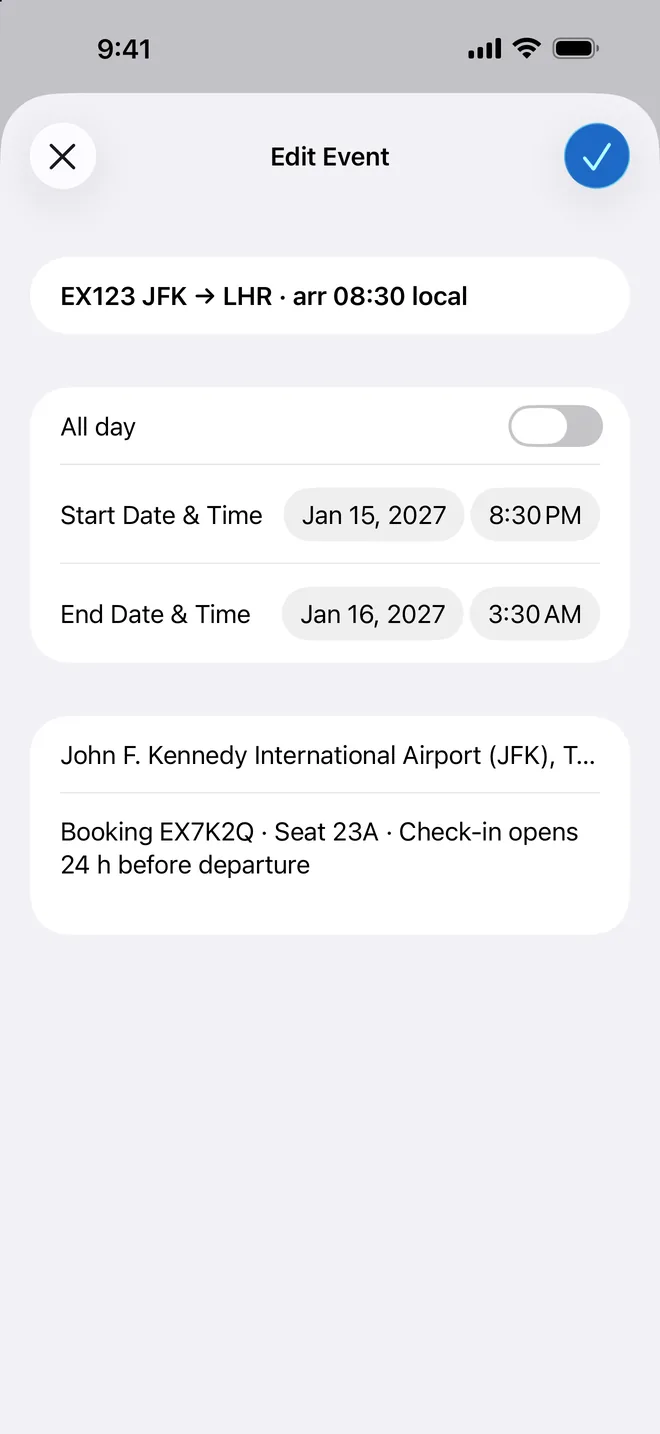
After saving or importing, open the event and confirm both dates, the zone, and the airports. Recheck the airline for schedule changes.
Scan with iPhone
Download free, then choose a weekly, monthly, or yearly plan in the app.
Airline cheat sheet
We read the airlines’ help pages on October 15, 2026, not the apps, so “not documented” means check the booking screen.
| Airline | What the airline’s pages say | Suggested route |
|---|---|---|
| Ryanair | Help center covers the itinerary email and “view itinerary” in myRyanair. No calendar export documented. | Method 1 if the itinerary lands in Gmail or Outlook; otherwise Method 2 or 3. |
| easyJet | Help pages cover the booking and boarding passes in the app. No calendar export documented. | Check the booking screen in the app; otherwise Method 2 or 3. |
| Lufthansa | The app page mentions adding booked flights to your personal calendar; Travel ID bookings appear under My flights. | Look in the booking under My flights, then check the times; otherwise Method 2 or 3. |
| Air Canada | The Manage my booking FAQ lists “Print or share your itinerary, and add it to your calendar” under My bookings. | Use it from My bookings, then check the saved event; otherwise Method 2 or 3. |
| Turkish Airlines | Manage Booking on the website and in the app. No calendar export documented. | Check Manage Booking; otherwise Method 2 or 3. |
| Southwest | App pages cover check-in, Wallet boarding passes, and flight status. No calendar export documented. | Check the trip details in the app; otherwise Method 2 or 3. |
| American Airlines | App pages cover trip management, notifications, and Live Activities. No calendar export documented. | Check the trip on aa.com or in the app; otherwise Method 2 or 3. |
Which method when
Leave the automatic setting on as a bonus. For several legs, or a booking that did not come from the airline, type or scan and plan a minute for the review.
| Method | Effort | Where it goes wrong | Several flights | Review |
|---|---|---|---|---|
| Automatic (Gmail, Apple Mail, Outlook) | None once the setting is on | Forwarded or cc’d emails, mailing lists, agency bookings, smart features off | One event per recognized confirmation | Open the event and check date and times |
| Manual entry | A few minutes per flight | A typo, the wrong zone, the wrong date for an overnight arrival | Typed one by one | Compare with the confirmation once |
| Scan a screenshot | A screenshot and a review per confirmation | A cropped year, two zones in one draft, small text | One draft per flight; count them against the legs | Every field shown before saving |
Frequently asked questions
Why isn’t my flight showing up in Google Calendar?
Google lists four reasons: a mailing list, you were only cc’d, the email was redirected from another account, or it is not a recognized confirmation. Smart features in Google Workspace and Show events from Gmail must also be on.
Can I add a flight by flight number?
Google Calendar, Apple Calendar, and Outlook do not look up flight numbers. Put the number in the title and take the times from the confirmation, or scan it.
How do I add a flight to Apple Calendar from Gmail?
With your Gmail account in the iPhone Mail app, Siri can suggest events found in Mail for you to add in Calendar (Settings > Apps > Calendar > Siri > Show in App). If Google Calendar already created the event, add your Google account to the iPhone. Otherwise screenshot the message and save the reviewed draft.
Does Outlook add flights automatically?
Yes, for Microsoft accounts: Microsoft says flight, car rental, and hotel reservations are added automatically. Change it under Settings > Calendar > Events from email in Outlook on the web, not in Outlook for Windows.
How do I add a return flight?
Create a separate event in the destination’s time zone, not your home zone. An overnight return lands on the next date; keep that date.
What time zone does the event use?
The one you set, or else your current zone, which is wrong once you travel. Apple Calendar has a Time Zone field under the start and end times; Google Calendar lets you create events with a specific zone.
Can I add a flight booked by someone else?
Yes, but a forwarded confirmation is the “redirected from another account” case Google describes, so type it or screenshot it and review the draft. Keep other passengers’ names out of a shared calendar.
How do I add a Ryanair flight to my calendar?
We found no calendar export in Ryanair’s help pages. If the itinerary email lands in Gmail or Outlook, it may be added for you. Otherwise open the itinerary in myRyanair or the app, screenshot it, and review the draft.
Sources, checked October 15, 2026: Google Calendar Help, Manage your events from Gmail; Apple Support, Create and edit events in Calendar on iPhone; Microsoft Support, Automatically add events from your email; Air Canada and Ryanair help pages. Photo2Calendar sends images to our backend for processing; see the privacy notice.
Put the whole trip on your calendar without typing it out
Scan each confirmation, review the fields, then save or export. Download free, then choose weekly, monthly, or yearly full access.
Download on the App Store